AI tools were used to help draft this post, with a human reviewing, fact-checking, and editing throughout.
AI workloads don't behave like traditional applications. They're iterative instead of deterministic, they depend on the quality of data that keeps shifting under your feet, and they introduce cost and risk patterns most cloud teams haven't had to manage before. Running them well on AWS isn't just a technical exercise, it's a strategic one, and it lives at the intersection of architecture, security, and financial governance.
This post lays out a practical playbook for leaders and architects building AI/ML and generative AI workloads on AWS, with a close eye on the two areas that tend to get bolted on too late: security and FinOps.
1. Start with the right mental model
Traditional applications follow step-by-step logic. ML workloads learn from data through continuous, iterative cycles, which means your models depend on high-quality input data to stay accurate. As that data evolves, ongoing monitoring and retraining become part of the operating model, not an afterthought. That single shift changes how you architect, secure, and budget for these systems.
2. Anchor your strategy in the AWS Well-Architected AI lenses
AWS significantly expanded its AI-specific guidance at re:Invent 2025, and it's the best starting point for any team building an AI strategy on AWS today. There are now three complementary lenses covering different stages of the AI journey.
- The Machine Learning Lens is a comprehensive framework spanning the full ML lifecycle: business goal identification, problem framing, data processing, model development, deployment, and monitoring. It's been updated to reflect newer capabilities like SageMaker HyperPod for large-scale training and SageMaker Unified Studio for collaborative data/AI workflows.
- The Generative AI Lens focuses on evaluating LLM-based architectures, including guidance on agentic workflows and HyperPod usage.
- The Responsible AI Lens, new as of late 2025, addresses safety, fairness, and governance throughout the AI lifecycle.
Together, these give architects, data scientists, and risk and compliance teams a shared framework instead of ad hoc decision-making.
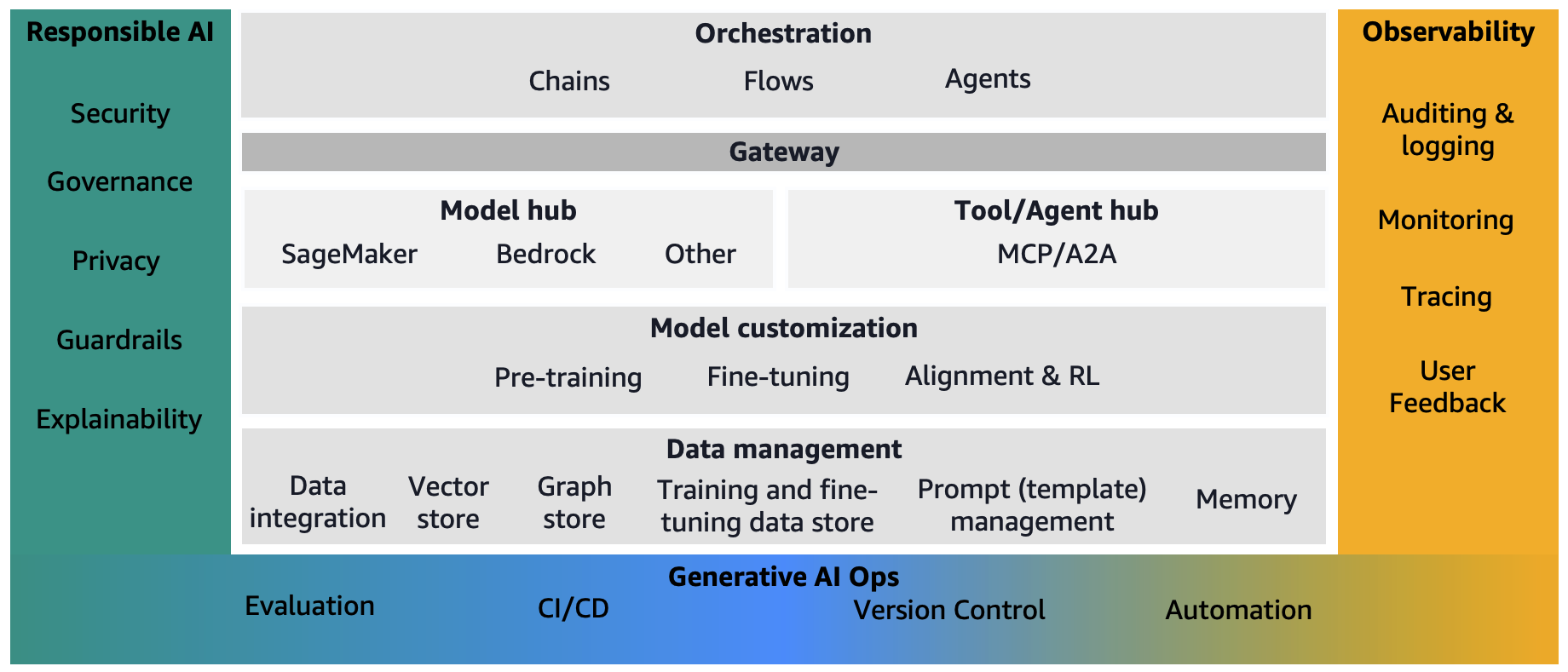
Zooming out, this is roughly what a mature generative AI foundation looks like once these pieces are in place: a model and tool hub sitting behind a gateway, orchestration for chains, flows, and agents, data management underneath, and Responsible AI and Observability running the full height of the stack rather than bolted on at one layer.
3. Make the buy-vs-build decision deliberately
Choosing between Amazon Bedrock (managed access to foundation models), Amazon SageMaker (custom training and fine-tuning), and raw EC2 (full infrastructure control) isn't just a technical call, it determines your security perimeter, your operational overhead, and your cost model for years. Bedrock trades flexibility for speed and a smaller attack surface. SageMaker gives you control at the cost of more to secure and manage. EC2 gives you everything, including everything you now have to own.
Get this decision wrong early and both your security and FinOps posture inherit the consequences.
What this looks like in practice
Despite how much gets written about fine-tuning and custom model training, very few organisations actually do it. The pattern we see far more often maps directly onto the diagram above: a gateway in front of Bedrock for model access, an orchestration layer handling agents and multi-step flows, and a knowledge base behind it doing retrieval-augmented generation (RAG) against the organisation's own data. Custom training is expensive, slow to iterate on, and usually unnecessary when a well-built RAG pipeline gets you most of the accuracy gain for a fraction of the cost and complexity.
If an architecture review keeps drifting toward "should we fine-tune a model," it's worth first asking whether better retrieval, better prompts, or better guardrails would get you there faster. For most teams, they will.
One AWS-native option worth flagging here is Claude Platform on AWS, a direct, Anthropic-operated path onto your existing AWS billing and IAM, separate from Bedrock. It's a genuinely different decision from the gateway-and-RAG pattern above, and one that deserves its own post rather than a paragraph here.
4. AI is a new attack surface, not an old one in disguise
Generative AI introduces threat patterns that didn't exist in traditional application security, and AWS's own security team has been actively publishing defenses against them.
Guardrails as policy infrastructure. Amazon Bedrock Guardrails now blocks a large share of harmful content and provides auditable, mathematically verifiable explanations for its filtering decisions. Critically, it can be applied consistently across foundation model calls, agents, knowledge bases (RAG), and multi-step flows, then centrally managed across an entire AWS organisation rather than configured account by account.
Novel attack patterns. AWS has documented and defended against encoding-based attacks, where bad actors use base64, hex, ROT13, or Unicode tricks to sneak harmful content past filters or extract it from model outputs. If your security team is still thinking in terms of classic injection attacks, this is a gap worth closing.
Compliance posture. Bedrock is built to support regulated environments, aligning with frameworks like GDPR, HIPAA, SOC, and FedRAMP High, a meaningful consideration if you're deploying in healthcare, finance, or the public sector.
Credential and key hygiene. As AWS has expanded Bedrock API key options, they've published specific guidance on implementing and monitoring these credentials, a reminder that AI service access needs the same rigor as any other privileged credential.
5. FinOps: where AI budgets actually go off the rails
AI cost overruns rarely come from one obvious place. They come from a hundred small decisions made without visibility. AWS has published a series of posts specifically on this problem, and it's worth building your cost strategy around it.
Token-level visibility matters more than service-level visibility. A single call to a large, complex-reasoning model can cost dramatically more than a call to a lightweight model doing simple summarization. If you're not tracking usage by use case, application, and team, not just by AWS service, you lose the ability to explain or control spend.
Pricing model choice is a lever, not a default. On-demand, provisioned throughput, and SageMaker Savings Plans all serve different usage patterns. Committing to the wrong one either wastes money on idle capacity or leaves you exposed to unpredictable bills.
Operational levers that compound. Prompt caching, knowledge base optimisation, right-sizing inference instances, and auto-scaling endpoints to match real demand are all concrete, implementable practices, not abstractions. Done well, they're the difference between AI becoming a controlled cost center and an unpredictable one.
6. A simple self-check before you scale
Before scaling any AI workload on AWS, ask:
- Has this architecture been reviewed against the relevant Well-Architected AI lens?
- Are guardrails deployed and centrally managed, not configured ad hoc per team?
- Is cost tracked at the use case and team level, not just the service level?
- Is there a named owner for AI governance and responsible AI policy?
If any answer is "no," that's your next sprint, not your next incident.